


Introduction
For fifteen years, mobile engineering followed an unspoken contract: the server holds the intelligence, and the client renders the interface.
We organised our codebases around static design patterns—MVC, MVVM, MVI, Clean Architecture—to turn deterministic network payloads into predictable, tap-driven screens. If a user wanted to book a cab, transfer funds, or track a package, they navigated deep menu hierarchies, filled out forms, and tapped “Submit.”
That paradigm is fracturing.
With quantized Large Language Models (LLMs) and Small Language Models (SLMs) running directly on mobile silicon via dedicated Neural Processing Units (NPUs), mobile apps are shifting from passive input forms to context-aware, autonomous systems. They can understand natural voice commands, interpret ambient sensor feeds, re-render layouts on the fly, and execute complex workflows across system boundaries.
Yet, this leap introduces an unforgiving reality: smartphones are inherently hostile environments. Handing probabilistic models direct access to native APIs, local storage, and physical-world execution turns your app into an attractive attack target.
Building software for this next generation isn’t about bolting a third-party chatbot onto an old view controller. It requires a complete architectural overhaul that balances ambient intelligence with uncompromising client-side security.
Beyond the Screen: How On-Device AI, Fluid Interfaces, and Security Will Reshape Mobile Development
For fifteen years, mobile engineering followed an unspoken contract: the server holds the intelligence, and the client renders the interface.
We organized our codebases around static design patterns—MVC, MVVM, MVI, Clean Architecture—to turn deterministic network payloads into predictable, tap-driven screens. If a user wanted to book a cab, transfer funds, or track a package, they navigated deep menu hierarchies, filled out forms, and tapped “Submit.”
That paradigm is fracturing.
With quantized Large Language Models (LLMs) and Small Language Models (SLMs) running directly on mobile silicon via dedicated Neural Processing Units (NPUs), mobile apps are shifting from passive input forms to context-aware, autonomous systems. They can understand natural voice commands, interpret ambient sensor feeds, re-render layouts on the fly, and execute complex workflows across system boundaries.
Yet, this leap introduces an unforgiving reality: smartphones are inherently hostile environments. Handing probabilistic models direct access to native APIs, local storage, and physical-world execution turns your app into an attractive attack target.
Building software for this next generation isn’t about bolting a third-party chatbot onto an old view controller. It requires a complete architectural overhaul that balances ambient intelligence with uncompromising client-side security.
1. What the Future of Mobile Apps Looks Like
Before restructuring our codebases, we need to understand how user interaction is fundamentally changing.
Fluid Sub-Agents Instead of Static Tabs
The classic bottom navigation bar is fading. Instead of rigid tabs, tomorrow’s navigation items will function as self-contained sub-agents.
A “Transit” tab won’t just display ticket receipts. When you touch down at an airport, it will read your itinerary, check local terminal maps, display your baggage carousel, and prepare a rideshare request before you even break stride.
Intent-Driven Natural Automations
Setting up automations used to demand rigid, formulaic scripts (“If trigger X happens, run script Y”). With local SLMs, users can express long-term, multi-variable intent in plain language:
“Order milk every Tuesday morning, but if my calendar shows I’m out of town, pause the order and pay from my primary wallet.”
The OS and underlying apps will parse that conversational intent, map it to secure background workers, and orchestrate actions across services without manual user upkeep.
Ambient Accessibility & Gaze Interactions
Accessibility is shifting from manual toggles to hardware-driven intelligence. Eye-tracking and retinal focus allow users to navigate interfaces and trigger actions using visual dwell time alone.
Combined with on-device voice processing, interfaces become zero-touch: you look at an element, speak your intent (“pay this” or “archive”), and the app executes it instantly.
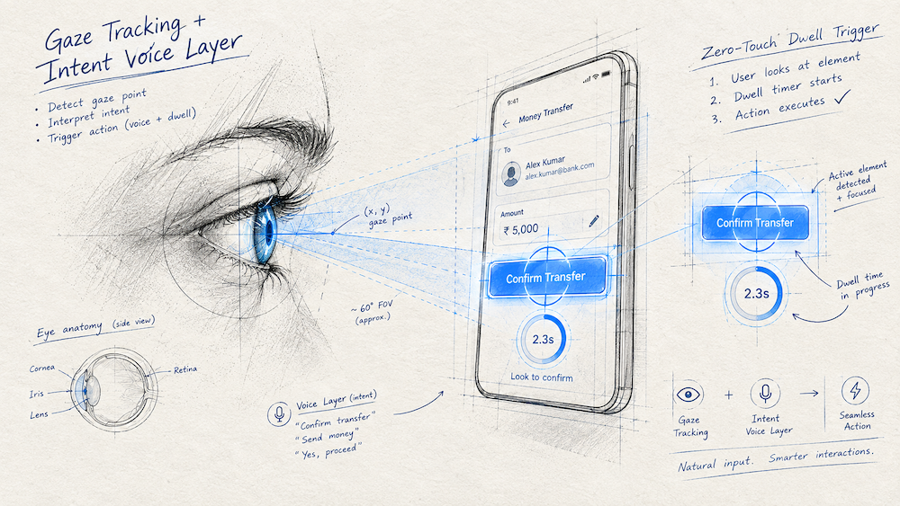
eye tracking
2. The Cognitive Guardrail: The OS “Pause” Interceptor
As apps grow more autonomous, screen fatigue and impulsive decision-making become pressing concerns. Just as mobile platforms introduced hardware-enforced distance alerts when devices are held too close to the eyes, the next phase will likely introduce an OS-level Pause Interceptor.
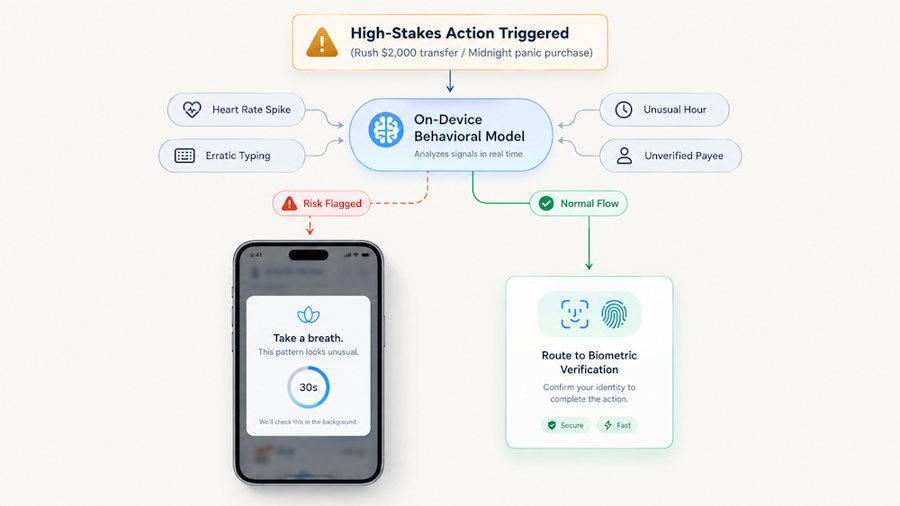
rush transfer
- Anti-Fraud Behavioral Monitoring: If an elderly user receives an urgent, scam-driven call and attempts to transfer life savings, a local SLM detects abnormal behavioral markers (erratic typing, rapid screen taps, elevated smartwatch heart rates, or an unfamiliar recipient).
- Opt-In Interceptor APIs: High-risk applications—such as banking, crypto, and payment wallets—will register with this system service. Before a critical transaction commits, the OS takes over the viewport: “Take a breath. This is an unusual rush pattern. Are you sure you know this recipient?”
- Local Privacy Safeguards: Because the behavioral model runs entirely on-device, your emotional and physiological states remain strictly on your phone, never exposed to cloud servers or ad trackers.
3. The Architecture Gap: Today’s Code vs. The Next-Gen Stack
Most applications built today cannot support these ambient, agentic capabilities. Their architecture is simply too static:
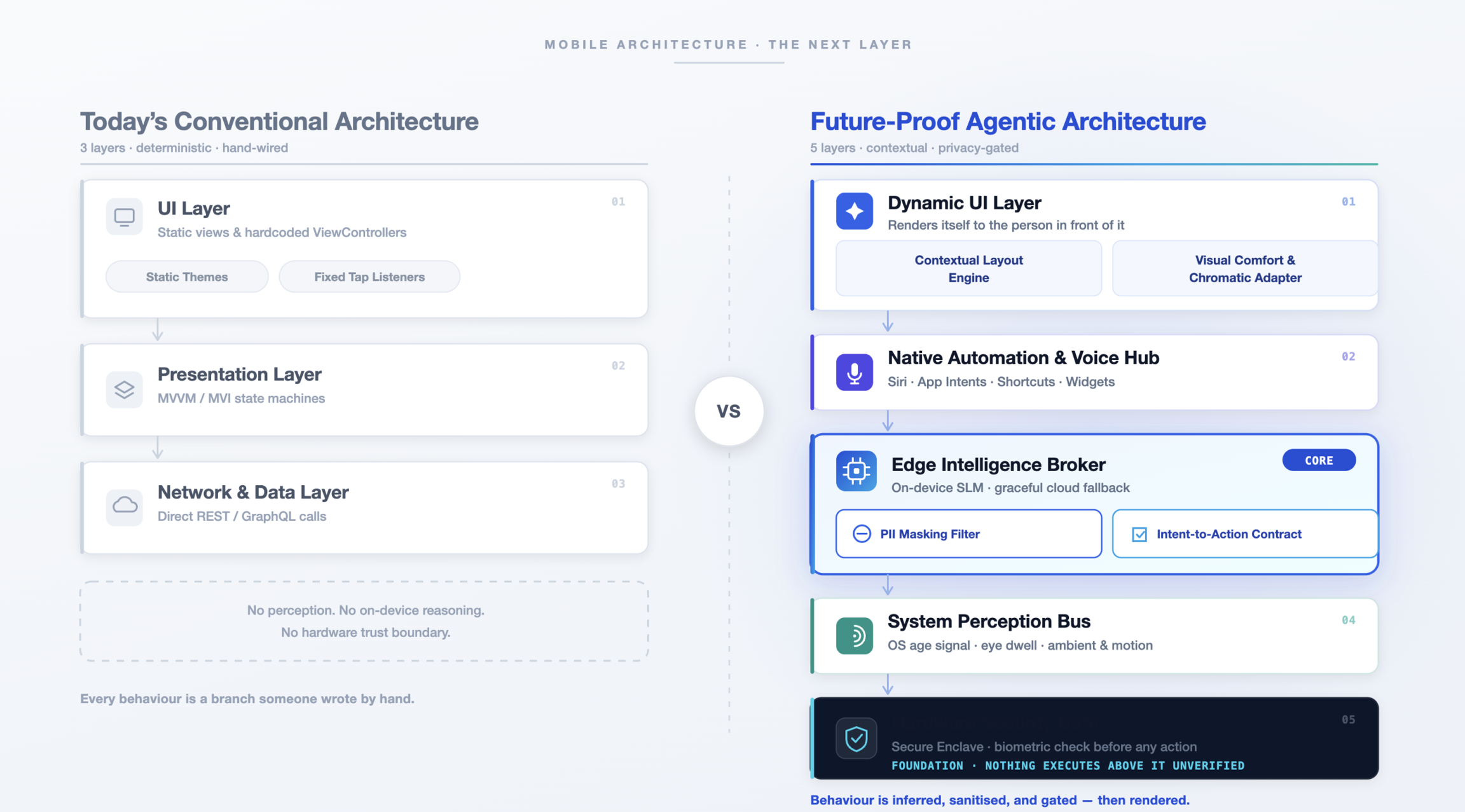
architecture gap
4. Building the Core Modules
To make our apps resilient to this shift, we need to decouple our UI and business logic from hardcoded assumptions. Here are the four foundational modules every forward-looking mobile codebase needs:
A. Edge Intelligence Broker (Swappable SLM / Cloud Gateway)
Your UI should never call an LLM directly. All natural language and intent processing must flow through an Edge Intelligence Broker. This keeps business logic completely independent of whether an action was interpreted by a local SLM running on the phone’s NPU, a private cloud fallback, or a rule-based parser.
protocol EdgeIntelligenceBrokerProtocol {
    func resolveIntent(from input: String) async -> AppIntentAction
}

final class EdgeIntelligenceBroker: EdgeIntelligenceBrokerProtocol {
  var localSLM: ModelInferenceDriver?
  var remoteVPC: ModelInferenceDriver
  var filter: PIIMaskingPipeline

func resolveIntent(from input: String) async -> AppIntentAction {
    let clean = filter.sanitize(input)

    if let local = localSLM, local.isReady, let res = try? await local.evaluate(clean) {
      return IntentSchemaParser.map(res)
    }

  let remoteRes = try? await remoteVPC.evaluate(clean)
  return remoteRes.map(IntentSchemaParser.map) ?? .unknown
  }
}
B. Contextual Layout Engine (Age & Demographic Adaptation)
Future operating systems will expose privacy-preserving demographic and accessibility signals (such as age group classifications, low-vision modes, or motor tremor settings).
Instead of hardcoding element sizes and fixed layouts, use a dynamic engine that computes touch target sizes and animation curves dynamically:
enum UserContext { case child, adult, senior }

struct LayoutConfig {
  let touchTarget: CGFloat
  let fontOffset: CGFloat
  let animDuration: Double
}

extension LayoutConfig {
  static func resolve(for context: UserContext) -> LayoutConfig {
  switch context {
    case .senior:
    return .init(touchTarget: 60, fontOffset: 4, animDuration: 0.15)
    case .child:
    return .init(touchTarget: 52, fontOffset: 2, animDuration: 0.35)
    case .adult:
    return .init(touchTarget: 44, fontOffset: 0, animDuration: 0.25)
  }
 }
}
C. Visual Comfort Adapter (Spectral & Contrast Theming)
Static color assets fail to account for how light affects human vision throughout the day. The Visual Comfort Adapterdynamically balances text luminance, blue-light levels, and contrast ratios (adhering to WCAG AAA standards for seniors) using real-time ambient lux and screen settings:
struct VisualComfortAdapter {
  static func palette(isDark: Bool, lux: Double, isSenior: Bool) -> Palette {
  let nightShift = lux < 10.0 // Bedside/low-light reading condition
}
  return Palette(
    bg: nightShift ? Color(hex: 0.FAF6EC) : .white,
    text: isSenior ? .black : Color(white: 0.1),
    accent: .blue
  )
 }
}
D. Native Automation Hub (Siri / App Intents)
Apps must expose their capabilities to system-level voice engines and shortcuts. But because generative agents can be tricked, you must never allow autonomous code to commit high-stakes actions without a hardware-backed biometric verification.
import AppIntents

struct TransferFundsIntent: AppIntent {
  static var title: LocalizedStringResource = "Transfer Funds"

  @Parameter(title: "Recipient") var recipient: String
  @Parameter(title: "Amount") var amount: Double

  func perform() async throws -> some IntentResult & ProvidesDialog {
    guard await BiometricGate.verify(reason: "Transfer $(amount) to (recipient)") else {
    return .result(dialog: "Authentication failed. Transaction halted.")
    }

   let success = await BankingService.shared.send(amount, to: recipient)
   return .result(dialog: success ? "Sent $(amount)." : "Transfer failed.")
  }
}
Adaptive Accessibility: On-Device AI with Real-Time Typing Intent & Smart Correction
To reduce input friction for senior users, our architecture features an On-Device Assistive AI Correction Engine paired with a real-time screen-edge Neural Aura. As users type, local SLMs actively analyze intent and present a side-by-side Smart Correction modal to refine misspelled prompts before execution—all computed 100% offline with zero cloud latency and complete PII privacy.
Repo link:
https://github.com/pyushb/beyondthescreen
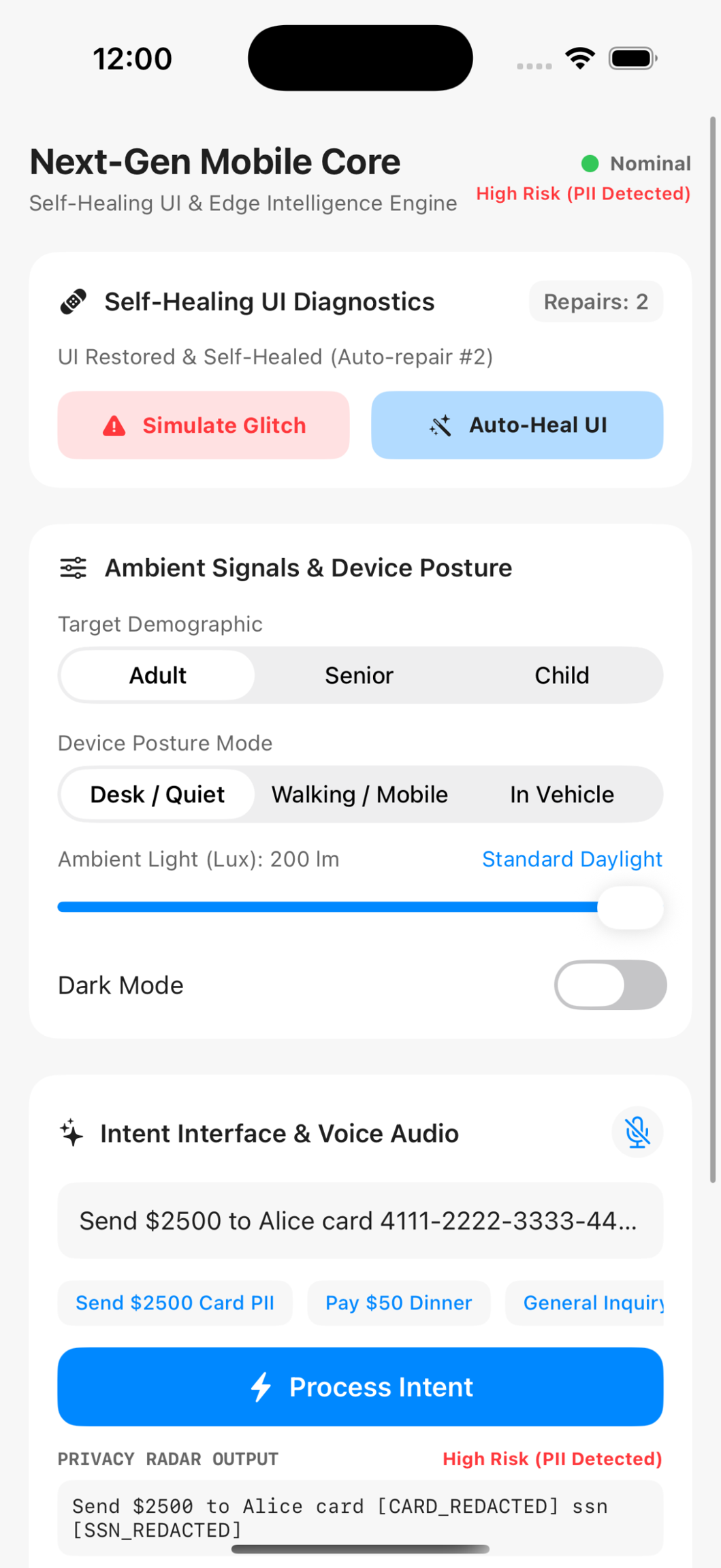
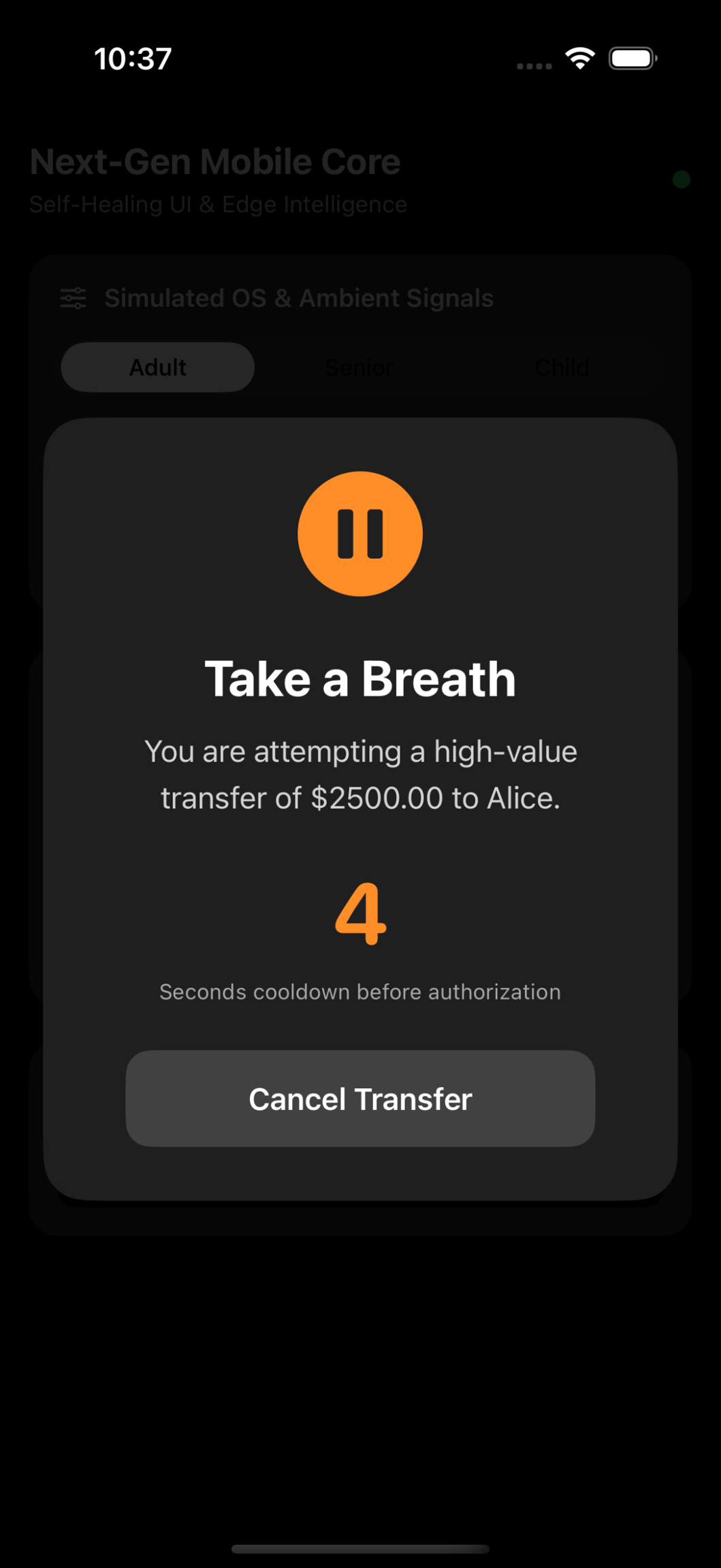
App screenshots
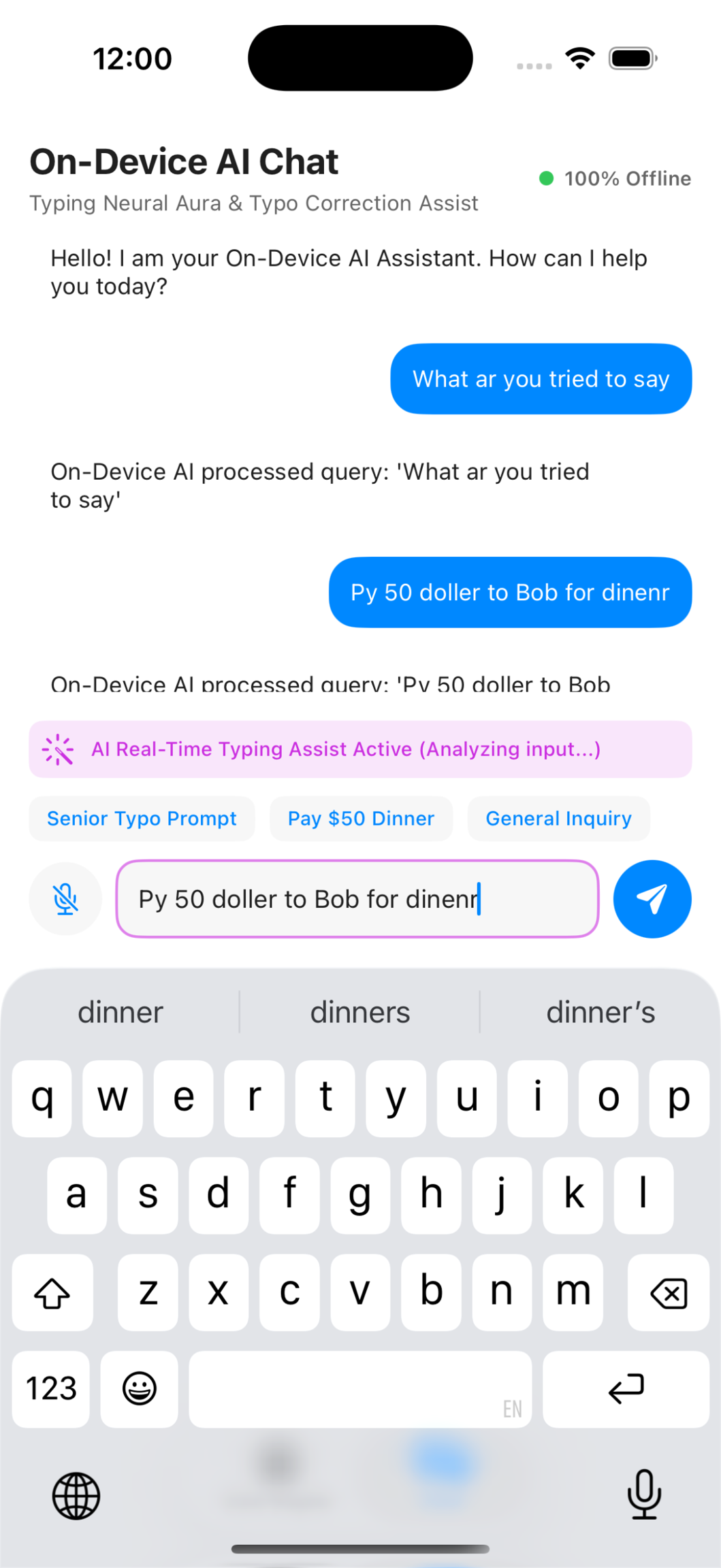
monitored chat
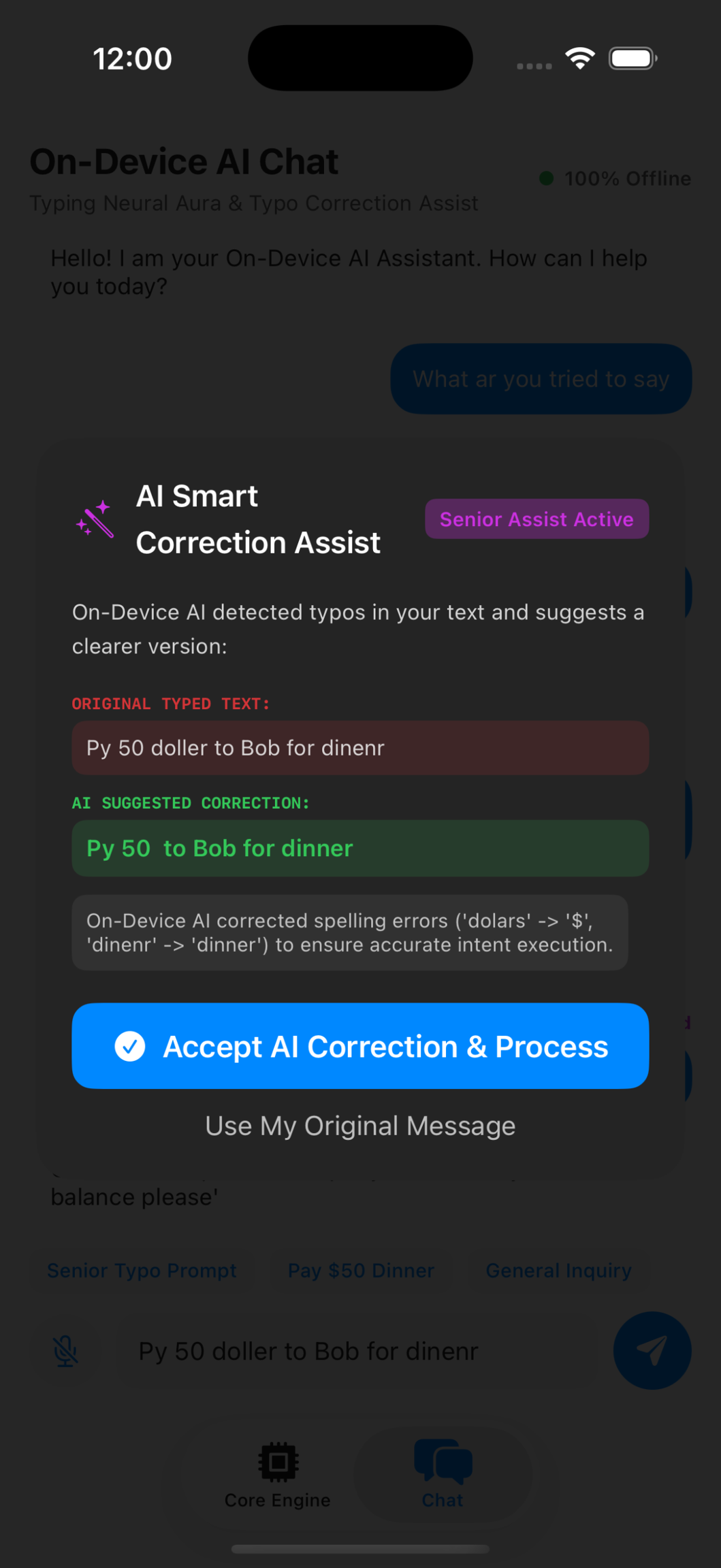
corrected chat
Path Forward for Mobile Engineers
The era of spending most of a sprint tweaking layout margins and coordinating complex view stacks is ending. Mobile development is shifting from a visual-layout focus to a systems-engineering discipline. The most resilient applications will be crafted by teams that treat on-device AI as an ambient capability, design their user interfaces to dynamically adapt to the physical human using them, and erect strict cryptographic barriers around every intent-driven action.