


Elasticsearch Has 20,000 Shards: What Actually Happens When You Restart a Node?
Introduction
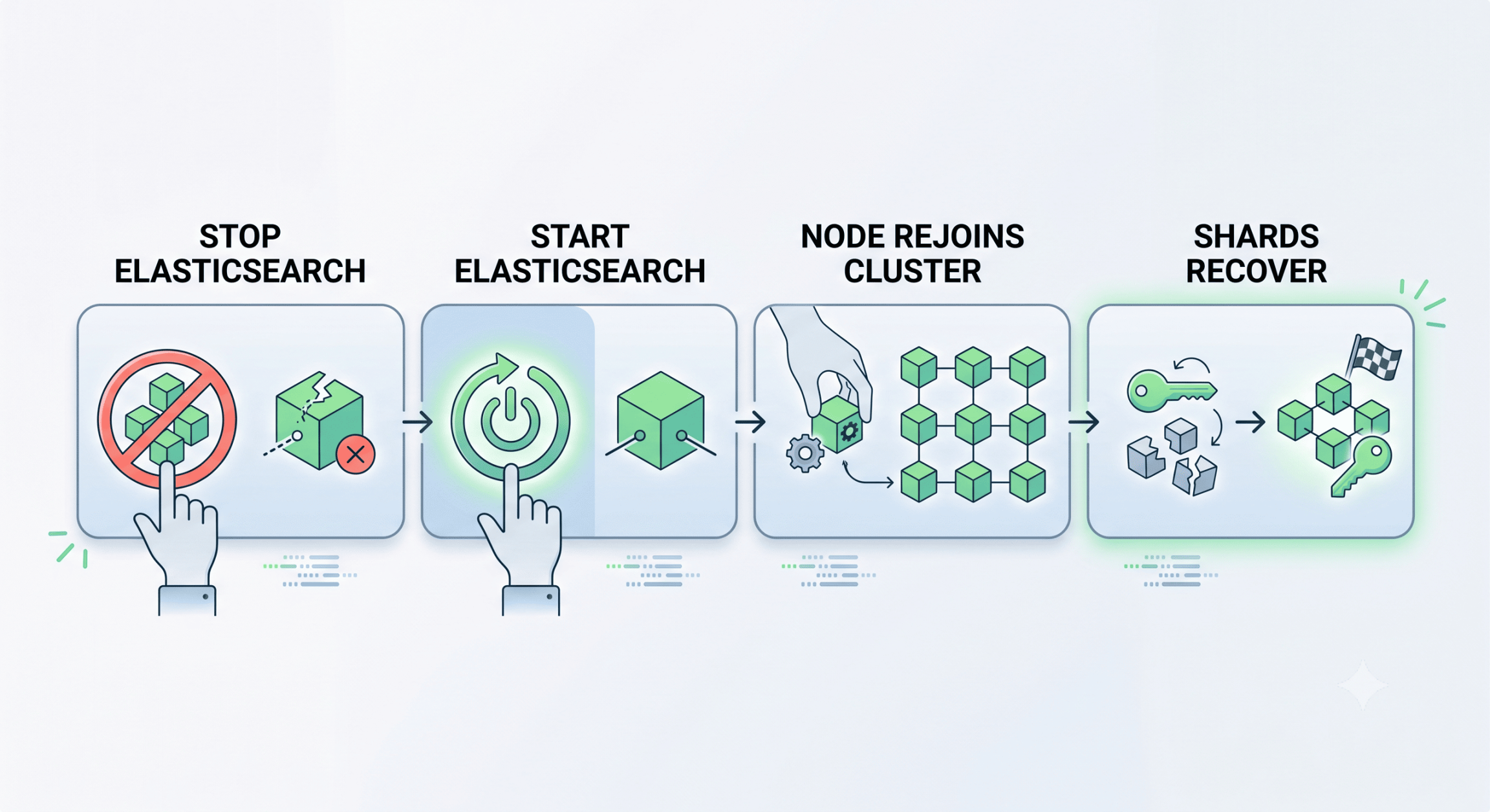
Restarting an Elasticsearch node sounds simple:
Node Restart Flow
That assumption changes when a cluster contains thousands of shards.
In one production environment I worked with, the Elasticsearch cluster had approximately 20,000 shards. A node restart could trigger extensive shard recovery, allocation, disk I/O, network traffic and cluster-state changes.
The server could be healthy while Elasticsearch still took significant time to return to a stable state.
This article explains what happens during a restart, how I troubleshoot slow recovery, and what I learned from operating a high-shard cluster.
1. Why Shard Count Matters
A shard is more than a number in Elasticsearch. Each shard represents a Lucene index with its own segments, files and metadata.
For example:
2,000 indices × 10 shards = 20,000 shards
A node restart can therefore trigger a large number of allocation and recovery operations.
The impact depends on:
- Shard size
- Number of shards on the affected node
- Primary/replica configuration
- Disk and network performance
- CPU and memory
- Current indexing/search workload
- Allocation rules
Two clusters with the same shard count can therefore behave very differently during recovery.
2. What Happens When a Node Restarts?
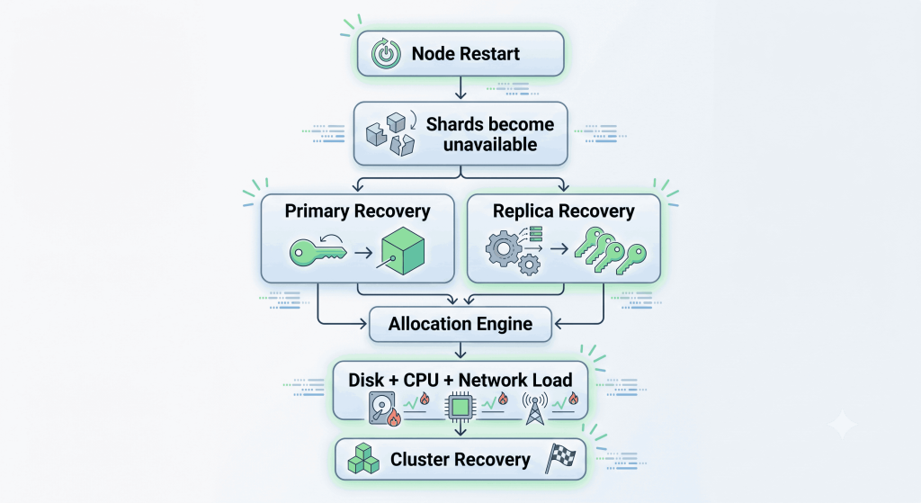
When Elasticsearch detects that a node has left the cluster, it evaluates the shards that were hosted there.
Restart Checklist
For each affected shard, Elasticsearch determines:
- Whether it is a primary or replica
- Whether another valid copy exists
- Where it can be allocated
- Whether allocation rules allow placement
- Whether sufficient disk space is available
- Whether recovery is being throttled
If a valid copy is available, Elasticsearch can recover the shard locally or from another node.
With thousands of shards, these operations can happen at significant scale.
A node restart in a large Elasticsearch cluster is not just a service restart. It is a distributed recovery event.
3. How I Troubleshoot Slow Recovery
I avoid changing Elasticsearch settings immediately. First, I determine whether the bottleneck is recovery, allocation, disk performance or another resource constraint.
Step 1: Check Cluster Health
curl -s "http://localhost:9200/_cluster/health?pretty"
I mainly check:
status
number_of_nodes
active_shards
initializing_shards
relocating_shards
unassigned_shards
For example:
initializing_shards: 300
unassigned_shards: 0
indicates active recovery.
If unassigned shards remain high while very few shards are initializing, allocation needs investigation.
Step 2: Check Shard Distribution
curl -s "http://localhost:9200/_cat/shards?v"
For focused output:
curl -s "http://localhost:9200/_cat/shards?v&h=index,shard,prirep,state,node,store"
Look for:
UNASSIGNED
INITIALIZING
RELOCATING
Also check whether one node is carrying significantly more shards than others.
Step 3: Check Recovery
curl -s "http://localhost:9200/_cat/recovery?v"
Useful fields include:
index
shard
stage
source_host
target_host
files_percent
bytes_percent
time
This helps determine whether recovery is actually progressing.
A cluster can appear stuck while recovery is steadily moving forward.
Step 4: Explain Unassigned Shards
For unassigned shards, I use:
curl -X GET "http://localhost:9200/_cluster/allocation/explain?pretty"
-H "Content-Type: application/json"
One important lesson from production troubleshooting is:
UNASSIGNED does not automatically mean ALLOCATION_FAILED.
For example, a sample response might show:
{
  "index" : "sample-data-processor-2026.09.10",
  "shard" : 0,
  "primary" : true,
  "current_state" : "unassigned",
  "unassigned_info" : {
    "reason" : "CLUSTER_RECOVERED",
    "last_allocation_status" : "throttled"
  },
  "can_allocate" : "yes",
  "allocate_explanation" : "Elasticsearch can allocate the shard.",
  "target_node" : {
    "name" : "node-1"
  },
  "node_allocation_decisions" : [
    {
      "node_name" : "node-1",
      "node_decision" : "yes",
      "store" : {
        "in_sync" : true
      }
    }
  ]
}
The important clues are:
- CLUSTER_RECOVERED — the shard became unassigned during cluster recovery.
- throttled — the previous allocation status was throttled.
- can_allocate: yes — Elasticsearch can currently allocate the shard.
- node_decision: yes — a suitable target node exists.
- in_sync: true — a valid shard copy is available.
This means an unassigned shard is not necessarily stuck because of an allocation failure. Before forcing allocation or changing recovery settings, check whether recovery is progressing.
For a specific shard, provide the target explicitly:
curl -X GET "http://localhost:9200/_cluster/allocation/explain?pretty"
-H "Content-Type: application/json"
-d '{
  "index": "sample-data-processor-2026.09.10",
  "shard": 0,
  "primary": true
}'
4. Recovery Is a Resource-Balancing Problem
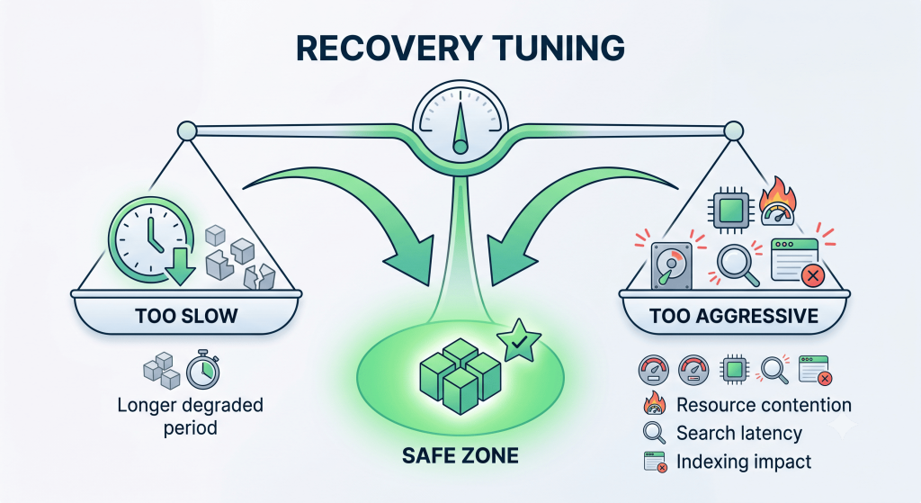
Faster recovery is not always better.
Recovery consumes:
- Disk I/O
- Network bandwidth
- CPU
- Memory
- File descriptors
At the same time, Elasticsearch may still be handling indexing, searches, replication, merges and Kibana queries.
The objective should therefore be:
Balance Recovery
Maximum safe recovery speed, not maximum recovery speed.
5. Recovery Settings That Matter
Two settings became particularly relevant when investigating recovery behavior.
cluster.routing.allocation.node_initial_primaries_recoveries
This controls concurrent initial primary shard recoveries on a node.
Check the current configuration with:
curl -s "http://localhost:9200/_cluster/settings?include_defaults=true&pretty"
A persistent value can be configured through the cluster settings API:
{
  "persistent": {
    "cluster.routing.allocation.node_initial_primaries_recoveries": 20
  }
}
The value should be tuned according to the environment rather than copied blindly.
indices.recovery.max_bytes_per_sec
This controls recovery bandwidth.
For example:
{
  "persistent": {
    "indices.recovery.max_bytes_per_sec": "125mb"
  }
}
Increasing it may shorten recovery time, but can also increase resource contention.
My approach is:
Measure
↓
Change one setting
↓
Observe
↓
Measure again
↓
Keep / revert
Measure first, tune second.
6. Don’t Forget the Operating System
Elasticsearch recovery is closely tied to the underlying server.
Disk
iostat -xz 1
Check utilization, latency, throughput and queue depth.
If the disk is already saturated, increasing recovery concurrency can make recovery slower rather than faster.
File Descriptors
Check:
ulimit -n
For systemd:
systemctl show elasticsearch | grep LimitNOFILE
For the running process:
cat /proc/$(pgrep -f elasticsearch | head -1)/limits | grep "open files"
We encountered Too many open files during Elasticsearch operations.
The lesson was simple:
Increasing OS limits can remove a constraint, but it does not fix excessive shard counts.
7. Shard Count Is an Architectural Problem Too
After troubleshooting recovery repeatedly, another question becomes unavoidable:
Why do we have so many shards?
Consider:
10,000 indices × 2 shards = 20,000 shards
versus:
2,000 indices × 10 shards = 20,000 shards
Both produce the same shard count, but their operational behavior can differ significantly depending on shard size and workload.
There is no universal answer to:
“How many shards should one node have?”
It depends on shard size, hardware, heap, workload, recovery requirements and cluster architecture.
Adding more nodes can distribute the workload, but it does not reduce the total number of shards.
Recovery tuning is an operational optimization. Reducing unnecessary shard creation is an architectural optimization.
8. Lessons From Elasticsearch Upgrades
Recovery issues also became more complicated during Elasticsearch and Kibana upgrades.
Across multiple upgrades, we encountered:
- Older indices created under Elasticsearch 7.x
- Index write blocks
- Unassigned shards
- Allocation failures
- Disk pressure
- File descriptor limits
- Java/JVM requirements
- Kibana compatibility issues
This reinforced an important principle:
Do not treat an Elasticsearch upgrade as a package installation.
Before an upgrade, verify cluster health, snapshots, index compatibility, disk capacity, JVM requirements, Elasticsearch/Kibana compatibility and recovery status.
A healthy cluster before an upgrade is one of the strongest safeguards against a difficult upgrade.
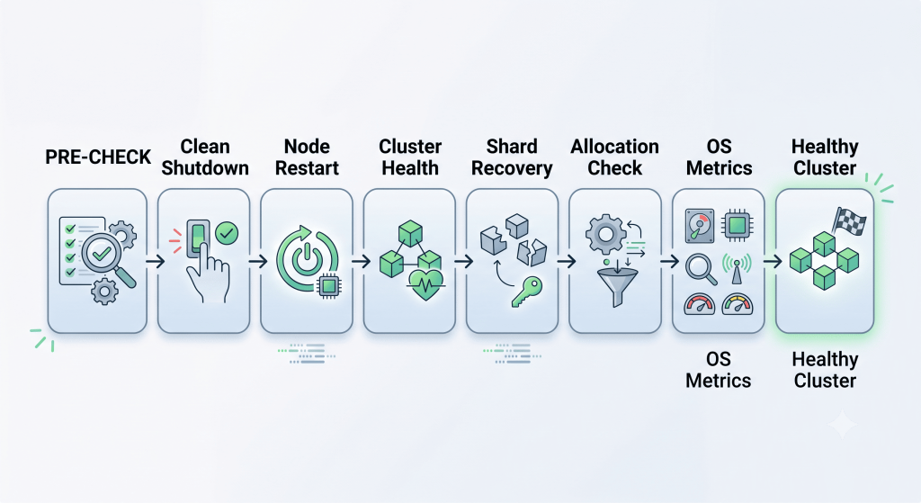
9. A Safer Node Restart Checklist
Before Restart
- Check cluster health
- Check unassigned shards
- Check active recovery
- Check disk, CPU and memory
- Check recent Elasticsearch errors
- Verify snapshots/recovery strategy
During Restart
- Stop Elasticsearch cleanly
- Confirm the process has stopped
- Start Elasticsearch
- Verify the node rejoins the cluster
After Restart
- Check
_cluster/health - Check
_cat/shards - Check
_cat/recovery - Check unassigned shards
- Use
_cluster/allocation/explainif required - Monitor disk I/O, CPU and network
- Check Elasticsearch logs
Recommended troubleshooting flow:
Shard Recovery
10. Final Takeaway
A small Elasticsearch cluster can make a node restart look like a simple service operation.
A large cluster makes it a distributed recovery event.
With approximately 20,000 shards, a restart can trigger thousands of allocation and recovery operations while the cluster continues serving production traffic.
When recovery is slow, ask:
Is the bottleneck:
- Disk?
- CPU?
- Network?
- Allocation?
- Recovery throttling?
- File descriptors?
- Shard count?
- Shard size?
Once the bottleneck is understood, recovery settings can be tuned safely.
The goal is not maximum recovery speed.
The goal is to restore cluster health as quickly as possible without taking the production workload down with it.
If high shard counts repeatedly make routine maintenance difficult, recovery tuning is only part of the solution. The longer-term question is whether the index and shard architecture itself needs to change.
References
- Elastic Documentation — Index Recovery Settings
https://www.elastic.co/guide/en/elasticsearch/reference/current/recovery.html - Elastic Documentation — Diagnose Unassigned Shards
https://www.elastic.co/docs/troubleshoot/elasticsearch/diagnose-unassigned-shards - Elastic Documentation — Cluster Allocation Explain API
https://www.elastic.co/docs/api/doc/elasticsearch/v9/operation/operation-cluster-allocation-explain - Elastic Documentation — Total Number of Shards Per Node
https://www.elastic.co/docs/troubleshoot/elasticsearch/increase-cluster-shard-limit