


Introduction:
Static frontends and containerised backends increasingly need to communicate with each other without having the frontends’ S3 buckets or the backends’ services exposed to the public internet. A common configuration is a frontend hosted on S3 and a backend running on ECS behind an Application Load balancer (ALB). When both are locked down — the S3 bucket kept fully private and the ALB kept internal — there’s no direct path between them out of the box. The bucket has no public website endpoint, and the ALB has no public DNS name.
This is where Amazon CloudFront comes in. Acting as a single public entry point, CloudFront can serve private S3 content and route API traffic into a private VPC, without either backend component ever touching the public internet directly.
A typical old-style setup, before purpose-built connectivity patterns existed, looked like this:
Public DNS → Public ALB → Frontend → Private ALB → Backend Service
Service Connectivity Flow – Old Way
This works, but it means running and securing a public-facing load balancer purely to bridge frontend and backend, along with the usual overhead: extra hops, extra cost, and a bigger attack surface.
Two connectivity patterns solve this more cleanly on AWS today:
- CloudFront + API Gateway + VPC Link — routes API traffic through a managed API layer before reaching the private ALB.
- CloudFront + VPC Origins — routes API traffic directly from CloudFront into the VPC, with no API Gateway in between
Both patterns leave the S3 bucket private (via Origin Access Control) and the ALB private (internal scheme), with CloudFront as the only publicly accessible service.
Option 1: CloudFront + API Gateway + VPC Link
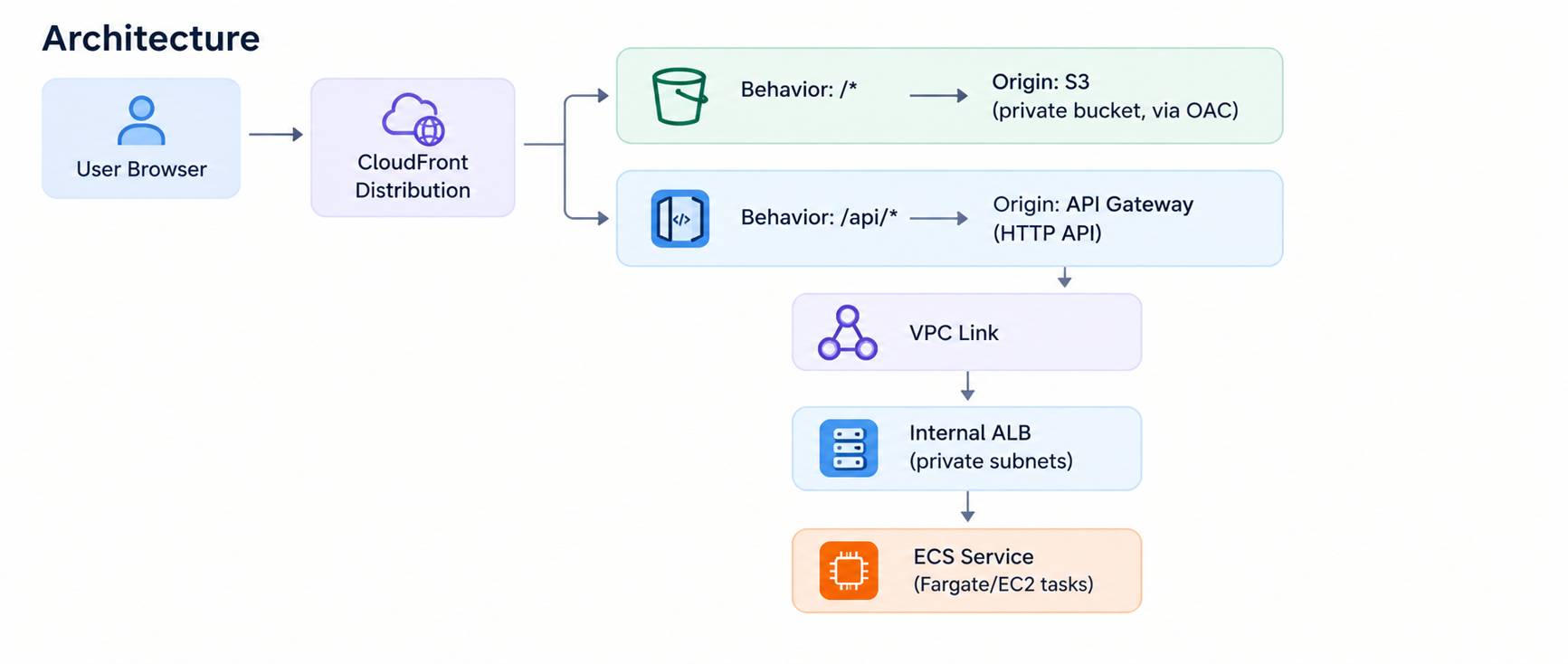
Diagram
This is the more conventional approach, and the one you want to take if you need authentication, validation, or throttling built into your API.
Setting It Up
Step 1: Making Your S3 Bucket Private Using OAC
Create the bucket, ensure that public access is disabled, then create an Origin Access Control (OAC) within CloudFront, and you must attach this to your S3 origin. Update your bucket policy to grant access to s3:GetObject from your CloudFront distribution.
Step 2: Set Up the Private ALB and ECS Service
You can create both the ALB and the target group separately and then link them to the ECS service, or ECS can take care of all these actions for you. It’s easier to go with the latter approach and create the ALB together with the ECS service creation process. While you’re setting up the service, you select Application Load Balancer as the load balancing type, scheme internal and your private subnets, and ECS creates the ALB, listener and target group (IP Target Type for Fargate) for you automatically.
Whichever way you do it, the security group of the ALB must allow incoming connections only from the security group of the VPC Link that will be created later.
Step 3: Create a VPC Link
Create a VPC Link for HTTP APIs, pointing at the private subnets where your ALB lives. Update the ALB’s security group to accept inbound traffic from the VPC Link’s security group, and ensure the VPC Link’s security group allows outbound traffic to the ALB on the listener port.
Step 4: Create the HTTP API and Integration
Create an HTTP API and add a VPC Link integration that points to your ALB listener ARN, then create a route (e.g. ANY /api/{proxy+}) that maps to it. Deploy the API to a stage.
Step 5: Add the API Gateway as a Second CloudFront Origin
Add the API Gateway’s domain as a second origin in your CloudFront distribution, and then add a /api/* behavior that routes to it (cache disabled, AllViewer origin request policy). Make sure that the /api/* path is above the Default (*) behavior.
Since the S3 bucket and the API are both on the same origin (CloudFront), they can share a single origin, so there is no need to configure any CORS headers.
Pros:
- In-built request validation and authorizer services (Lambda, JWT) – useful for APIs that need something beyond route level access control.
- Built-in throttling and usage plans for rate-limiting clients.
- Familiar, widely-documented pattern with strong AWS tooling support.
Cons:
- More moving parts: API Gateway and VPC Link both need to be provisioned and maintained.
- An extra hop compared to routing directly to the ALB, adding a small amount of latency.
- Higher setup complexity: ALB, VPC Link, HTTP API, and two CloudFront origins all need to be wired together correctly
Option 2: CloudFront + VPC Origins (No API Gateway)
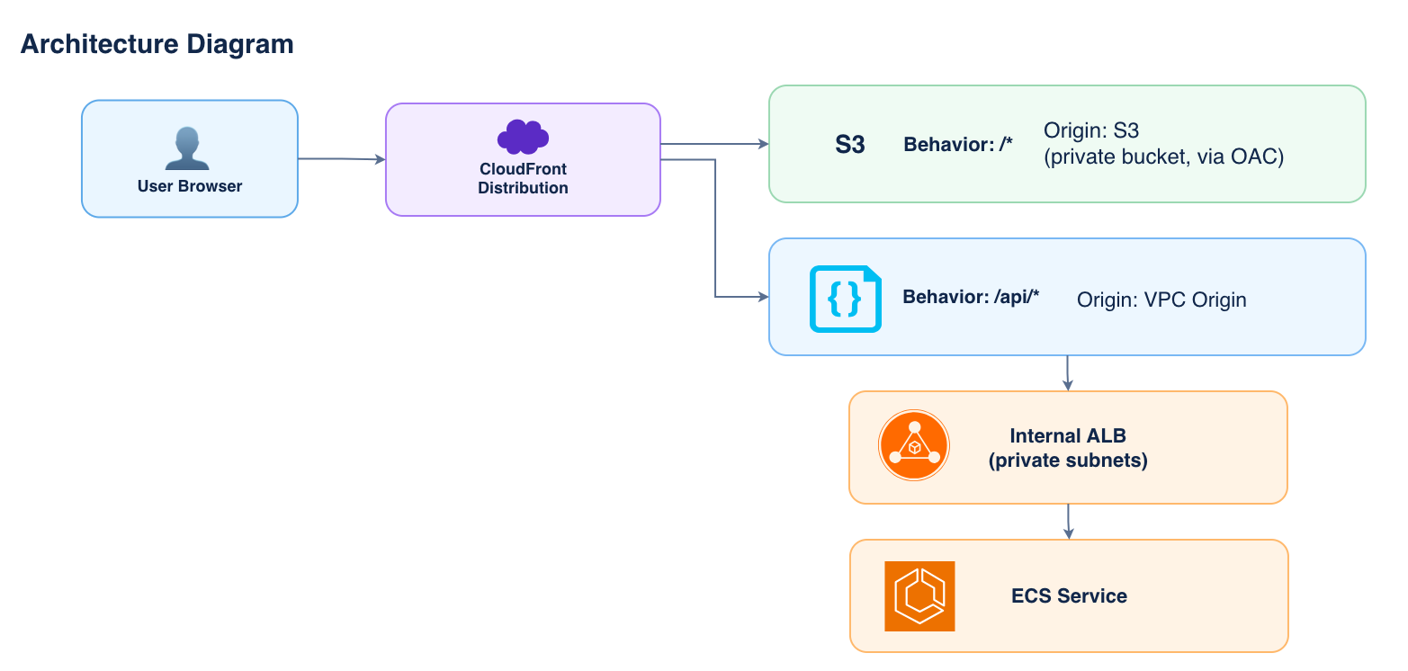
Diagram
With the introduction of VPC Origins in CloudFront, there’s no need for API Gateway at all. CloudFront connects to the VPC through a service-managed Elastic Network Interface (ENI) placed in your private subnet, so traffic reaches the internal ALB over private AWS networking without any public IP.
Here’s how it works:
- CloudFront serves static assets from the private S3 bucket via OAC, same as Option 1.
- Requests to /api/* are routed to a VPC Origin — a CloudFront-managed connection into your VPC.
- The VPC Origin forwards the request directly to the internal ALB, which routes it to a healthy ECS task.
- No API Gateway, no VPC Link — one fewer service in the request path
Setting It Up
Step 1: Make the S3 bucket private using OAC (same as option 1), bucket policy scope your CloudFront distribution.
Step 2: Setup the private ALB and ECS service.
As with Option 1, you can create the ALB separately or let ECS create it for you as part of the service setup, choosing Application Load Balancer, internal scheme, and your private subnets, which also gives you the target group (ip target type) automatically. You don’t need any public inbound rules here since you’ll be locking the ALB down to CloudFront’s managed security group in a moment.
Step 3: Create the VPC Origin in CloudFront.
Inside the CloudFront console, create a new VPC origin and specify the ALB created in step 2. This will create a managed ENI for the ALB (you don’t need to do anything else networking wise).
Step 4: Lock down the ALB security group.
The CloudFront service creates a service-managed security group for the VPC origin connection. Don’t change any rules on it! Instead, go to your ALB security group and add an inbound rule allowing traffic from the security group created by CloudFront.
Step 5: Configure Origins and Behaviors on the Distribution
Add the private S3 bucket (via OAC) as one origin and the VPC Origin as the other. Default (*) behavior → S3; path-based behavior (/api/*) → VPC origin, placed above the Default (*) behavior
Pros and Cons
Pros:
- Fewer moving parts — no API Gateway or VPC Link to provision or maintain.
- Lower latency — one fewer hop between CloudFront and the ALB.
- Simpler security model: a single CloudFront-managed security group controls access to the ALB
Cons:
- No built-in request validation, Lambda authorizers, or usage plans — these would need to be handled at CloudFront (via WAF) or the application layer instead.
- VPC Origins is not available in every AWS region — worth checking before committing to the architecture.
- Newer feature with a smaller body of community documentation compared to API Gateway
Which One Should You Use?
Both keep S3 and the ALB fully private, both put CloudFront in front — the difference is what sits between CloudFront and the ALB.
| CloudFront + API Gateway + VPC Link | CloudFront + VPC Origins | |
| Extra services needed | API Gateway + VPC Link | None (just CloudFront) |
| Request validation / authorizers | Built-in (Lambda, JWT) | Not built-in |
| Throttling / usage plans | Built-in | Not built-in (use CloudFront rate limiting / WAF instead) |
| Setup complexity | Higher (ALB + VPC Link + API + 2 origins) | Lower (ALB + VPC Origin + 2 origins) |
| Best for | APIs needing auth, quotas, validation | Simple, fewer-moving-parts backend routing |
If your API needs authorizers, request validation, or usage plans, API Gateway earns its keep. If you just need your frontend to reach its own backend securely and simply, CloudFront VPC Origins gets there with one fewer service.
Conclusion:
Both patterns have the same goal — expose a single CloudFront distribution that serves a fully private S3 bucket and fully private ECS backend, exposing nothing to the internet besides the CloudFront CDN.
CloudFront + API Gateway + VPC Link is better if you need built-in features like authorization or throttling for your API. CloudFront + VPC Origins is better if you want the absolute simplest setup possible. Either way, your private ALB does not need a public IP and everything is properly secured.