


Introduction
Learn how to leverage AI agents to transform one requirement into reviewed specification, architecture, Flutter implementation, tests, and proof-of-release. My previous article discussed how specifying a well-defined specification can help developers and AI agents in a reliable manner. However, what would happen if an agent had to learn the product, design, implement, test, and review its own work? It would become average in all aspects. An alternate approach is to assign each of these tasks into specialized roles using a single specified document.
Let us develop a small feature in Flutter and find out how an orchestrator leverages these roles.
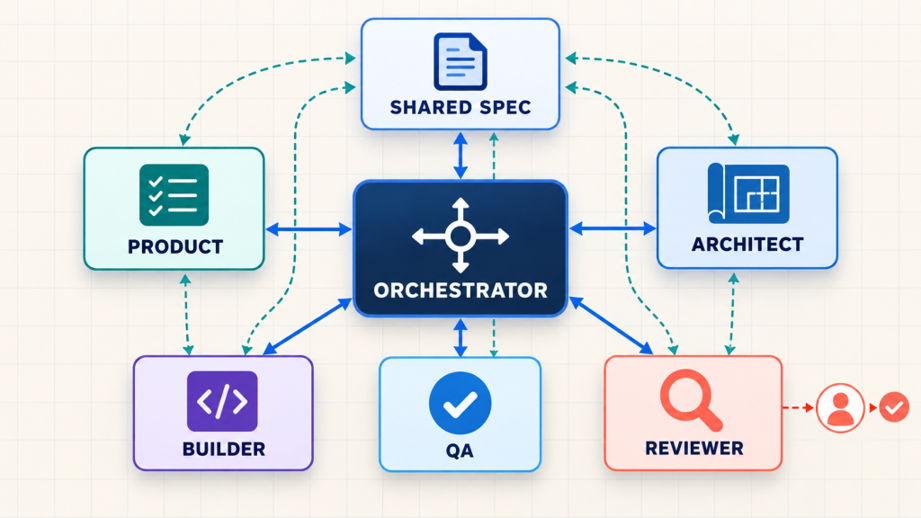
The orchestrator manages the flow; specialised agents produce evidence, and humans retain approval.
Our feature: Save an article for offline reading
The raw request is intentionally simple:
Let users download an article and read it later without an internet connection.
It is sent directly to the coding agent and this introduces hidden decisions around download limits, duplicates, persistence and storage failure. Rather, the orchestrator takes the feature through the five roles below.
The Orchestrator: Manage the flow, not the decisions
The Orchestrator Agent acts as the traffic controller. It assigns each role its packet that holds the feature ID, spec version, approved inputs, allowed operations, output format and criteria for when to stop. It validates the output, logs it and forwards it to the next role. If the Product Agent has a question that was left unresolved, the orchestrator stops the work and seeks input from humans. If QA identifies a missing criterion, it does not refer the issue to the builder but forwards it back to Product. It cannot alter the scope, architecture choice or merge decision.
1. Product Agent: Turn the idea into observable behaviour
The Product Agent does not choose a database or write Dart. Its job is to remove ambiguity and produce acceptance criteria.
Prompt:
Act as a product analyst. Convert the requirement into numbered, testable acceptance criteria. Identify missing decisions and edge cases. Do not propose implementation details.
After a human answers the open questions, the shared spec might contain:
feature: Offline Article Saving
requirements:
– id: OFF-01
rule: A saved article is readable after the app restarts.
– id: OFF-02
rule: Saving the same article again must not create a duplicate.
– id: OFF-03
rule: A user can store no more than 20 articles.
– id: OFF-04
rule: A storage failure shows a retry action without losing the screen state.
out_of_scope:
– synchronising downloads between devices
This is the first human checkpoint. Product approves the behaviour before any architecture is designed.
2. Architecture Agent: Design within real constraints
The Architecture Agent receives the approved spec and project conventions, then produces a short decision record.
Prompt:
Design the smallest solution that satisfies OFF-01 to OFF-04.
Follow the existing repository pattern. Keep storage replaceable and
business rules testable without Flutter widgets. List risks and trade-offs.
A useful response would define:
- An `ArticleStore` interface for persistent storage.
- An `OfflineArticleService` for duplicate and limit rules.
- Existing state management for loading, success, failure, and retry.
- No backend change because cross-device synchronisation is out of scope.
The agent may recommend SQLite or the existing local store, but a developer approves the choice.
3. Builder Agent: Implement against requirement IDs
The Builder Agent now has fewer decisions to invent. It receives the approved spec, architecture note, project rules, and the exact files it may modify. Here is the core business logic in Dart:
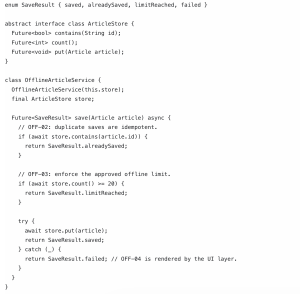
Prompt 1 sample code
The comments are intentionally tied to requirement IDs. They make reviews searchable and help the next agent connect code with expected behaviour.
4. QA Agent: Attack the boundaries
The QA Agent receives the spec and public behaviour, then searches for tests that would expose a wrong implementation.
Prompt:
Create tests for every requirement ID. Prioritise boundaries, persistence,
duplicate actions, and failures. Report any criterion that cannot be proven.
For `OFF-03`, a useful test checks both sides of the limit:
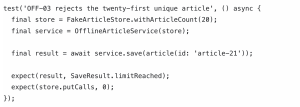
Test Case code example
QA may also flag that the service catches every error, including programming errors. That deserves review.
5. Reviewer Agent: Compare, do not rewrite
The Reviewer Agent receives the spec, architecture decision, code diff, and test results. It should not silently “improve” the implementation. Its job is to return evidence. A concise review might look like this:
OFF-01: PARTIAL — persistent store selected, restart test missing
OFF-02: PASS — duplicate path avoids store.put
OFF-03: PASS — boundary test covers exactly 20 items
OFF-04: PARTIAL — failure result exists, retry UI test missing
Architecture: CONCERN — broad catch may hide unexpected defects
Decision required: developer review
This report is far more useful than “the implementation looks good.” A human reviewer can see what is proven, what is assumed, and what must happen before merge.
The handoff contract matters more than the agents
Multi-agent development is not five chat windows discussing a feature endlessly. Each role needs a clear input and a limited output:
| Role | Reads | Produces | Must not do |
| Orchestrator | Status and approved artifacts | Work packets and audit trail | Make product or technical decisions |
| Product | Raw requirement | Acceptance criteria | Choose technology |
| Architect | Approved spec, project rules | Design decision | Change product scope |
| Builder | Spec and design | Code | Invent missing behaviour |
| QA | Spec and interfaces | Tests and gaps | Weaken criteria to pass |
| Reviewer | All artifacts and results | Evidence report | Approve on behalf of humans |
Store artifacts beside the code. Every handoff includes the spec version and requirement IDs, so agents use approved files rather than remembered chat history.
How to start your first multi-agent environment
Start with one feature in a shared repository. Create spec.yaml, architecture.md, test-report.md, and review.md. Give each role its own agent session and instructions; allow the Builder to edit code, while Product, Architect, QA, and Reviewer initially write only their own artifacts. The orchestrator reads the files and routes work, but does not edit the spec or code.
- Give the orchestrator the raw requirement and role rules.
Use OFF-01 to OFF-04 as the only approved requirements.
Run Product → human approval → Architect → human approval →
Builder → QA → Reviewer → human merge decision.
For each handoff, record the spec version, changed files,
evidence, open questions, and next owner. Stop if an answer
would change scope; ask a human. Retry a failed task once.
2. Let it ask Product for the spec, then pause for human approval.
3. Route the approved spec to Architecture, then Builder and QA.
4. Let Reviewer compare every artifact and test result.
5. Merge only after a person resolves the review findings.
Now run one feature sequentially. Product writes spec.yaml; a person resolves its questions and marks it approved. Architect proposes storage and state management; a developer accepts or revises that
decision. Builder implements against those two approved files. QA writes tests and records gaps. Reviewer checks the spec, code diff, and test results. The orchestrator sends gaps back to the relevant role, then
stops for a human merge decision.
Keep each handoff short: version, requirement IDs, artifact, evidence, open questions, and status. If OFF-03 changes from 20 to 50, increment the spec version and rerun affected roles. Do not let agents use old chat messages as authority. Once this manual workflow is dependable, automate routing, keep human approval gates.
References:
I have implement multi agent environment in a project in which agents and prompts are added. You can check that on link.
Conclusion
The importance of multiple agents within SDD is not the number of AI but the production of valuable disagreements. Product ensures behavior, Architecture defends the system, QA looks for failures, and Reviewer verifies the evidence. Humans will make decisions regarding the intent, risks, and tradeoffs. When each of the agents does its specific work and handoffs always lead back to the common specification, SDD with AI will become understandable and verifiable.